How to add a document
Keep your flight tickets, booking confirmations, and insurance policies safe and accessible. Note: This feature is available for Trav Plus members.
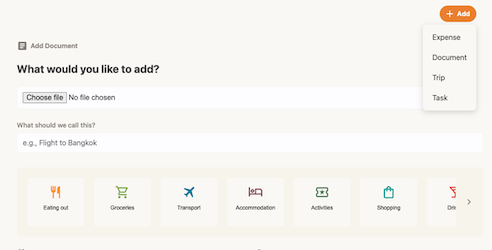
- Open the document form: Tap the + Add button at the top right of the app and select Document.
- Upload File: Tap the file input area to take a photo or upload a file from your device.
- Add Info: Give your document a name (e.g., "Return Flight") and select a category (add a custom category if needed).
- Link it (Optional): You can select a date and link the document to a specific Trip to keep things organized.
- Tap Add Document.
Offline Access: Once uploaded, you can tap the "Make available offline" button on any document to access it without an internet connection!