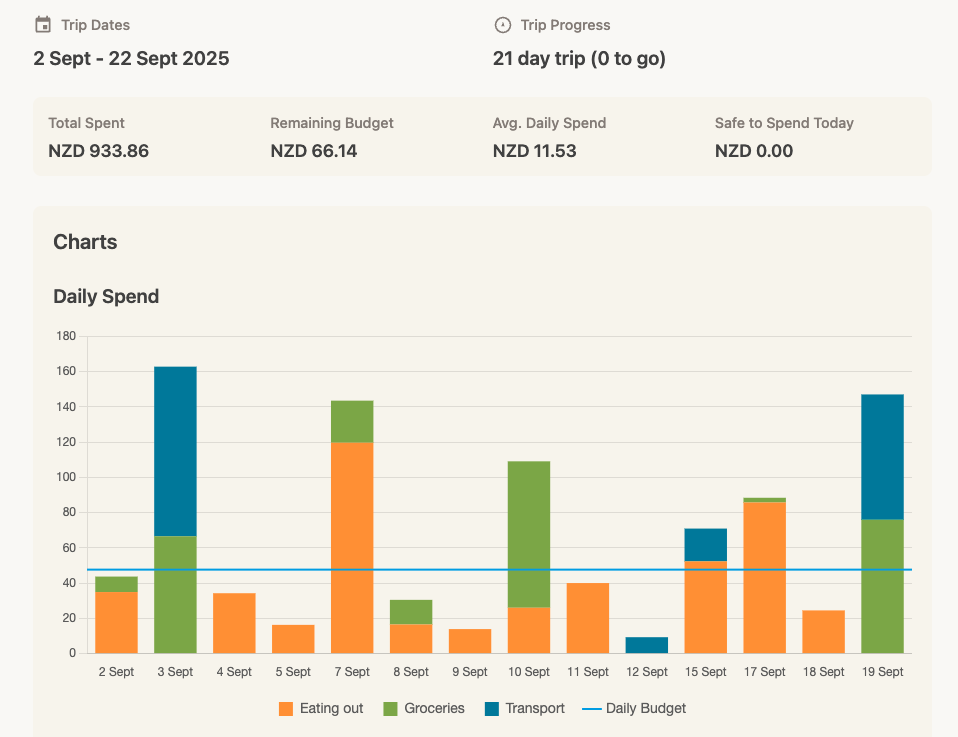
Guide to trip insights
See how you are doing against your budget for a specific adventure.
- Open a Trip: Go to Trips and select a specific trip.
- Overview Tab: The default view is the Overview tab.
- Key Metrics:
- Total Spent: Every dollar you've spent so far (including spending in advance) - in your home currency.
- Remaining Budget: What's left in the pot.
- Average Daily Spend: Get a snapshot view of what 'normal' looks like for a particular trip.
- Safe to Spend Today: Based on all of your spending to date (including forward committments), how much should you feel comfortable spending today - to stick within your budget.
- Spend per Day: A visual progress bar showing the total amount spent per day, broken down by category - against your daily budget.
- Category Budgets: If you set specific budgets (e.g., Eating out), we show a summary of spending against budget for each category.
- By Category: A donut chart showing your spending breakdown (e.g., 40% Food, 30% Accommodation).
- By Location: See where you spent the most in.